
Skimmers, Swimmers, and Divers: Content Chunking Strategy for Higher Ed AI Search
August 12th, 2026 by
This post was updated by Collin Guedon on August 12th, 2026, to reflect recent trends and refreshed statistics. It was originally published on July 30th, 2021.
TL;DR
Higher education websites have always needed to serve three kinds of readers: skimmers who scan, swimmers who explore, and divers who read every word. AI search added a fourth reader. Large language models pull answers at the passage level, so the same structure that helps a prospective student scan your program page also determines whether ChatGPT, Perplexity, or Google AI Overviews can lift a clean answer from it. A content chunking strategy for higher education makes every section of your site self-contained, clearly labeled, and quotable.
Key Insights
- Higher education sites need to be accessible and navigable for visitors in all stages of the marketing funnel, and now, for the AI systems those visitors ask first.
- AI search platforms retrieve at the passage level, typically pulling sections of roughly 100 to 300 words, so page-level optimization alone leaves answers on the table.
- A website optimized for user experience can positively impact SEO, AI citation frequency, and search rankings at the same time.
- Self-contained chunks win: each section should name its subject, answer its question in the first sentence or two, and make sense when quoted with no surrounding context.
Search Influence is a higher education digital marketing agency that builds content chunking strategies for institutions competing in AI search.
Website content should accommodate a variety of visitors. You want to create the optimal user experience, whether visitors are skimming for a few key points, swimming around on a few pages, or diving deeply into multiple pages and reading as much information as they can. A positive user experience can increase site dwell time and help drive conversions.
What changed since we first wrote about skimmers, swimmers, and divers is who else is reading. When you optimize your site for the three reader types, you establish it as an informative, helpful resource for your prospect at every stage of the marketing funnel. That same structure now doubles as the retrieval layer for AI answer engines. A site developed with the user in mind creates a strong sense of trust with the university, making users more willing to convert, whether by submitting basic personal information, contacting the admissions department, or filling out an application.
The stakes have moved earlier in the process. According to a national EAB survey of 5,000-plus high school students, 46% of students now use AI tools such as ChatGPT during their college search, up from 26% in spring 2025. Nearly one in five students removed a college from consideration based on information surfaced through AI-generated results. Those students were shaping a shortlist before your admissions office knew they existed. For the wider data set, see our roundup of AI search in higher education stats.
Let’s review common content found on higher education websites and how it can be chunked for each type of visitor, human and machine.
What Is a Content Chunking Strategy for Higher Education?
A content chunking strategy for higher education is the practice of breaking site content into clearly labeled, self-contained sections that a reader can scan and an AI system can retrieve without losing meaning.
The tactic is older than AI search. Clear headings, short paragraphs, and bulleted lists have always made dense academic content easier to consume. What AI added is a second consumer with a different reading pattern.
Search Engine Land’s guide to content chunking describes how modern search engines analyze individual chunks to determine which specific sections best answer a query, creating multiple opportunities for different parts of your content to appear in search results, AI Overviews, and featured snippets.
Chunking is an enabling layer, not a ranking trick. It will not rescue thin or inaccurate program content. What it does is make good content findable, extractable, and safe to quote.
Who Are Skimmers, Swimmers, and Divers?
While reading this blog, you’ll likely tackle the following content as a skimmer, a swimmer, or a diver.
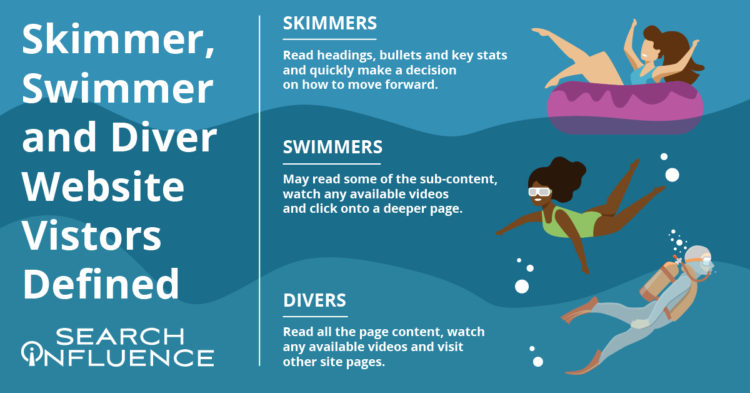
- Skimmers read the headings, bullets, and key stats, then quickly decide how to move forward.
- Swimmers read some of the sub-content, watch a video if one is available, and click onto a deeper page.
- Divers read all the content on the page, watch the video, and visit other pages on the site.
This post is organized with clear headings, bullet points, and plenty of white space for skimmers and swimmers. It also carries in-depth content under each heading, clickable internal and external links, and a straightforward navigation bar for divers who want to go deeper into higher education marketing strategy.
Just like a thoughtfully structured blog post that accommodates each type of reader, website content for any higher education institution should be curated to skimmers, swimmers, and divers.
Where Does AI Fit Into the Skimmer, Swimmer, Diver Model?
Add a fourth reader: the retriever.
AI systems do not read your page from top to bottom. Retrieval-augmented generation pipelines break a page into segments, score each segment against the user’s question, and feed only the winning segments to the model that writes the answer.
The retriever behaves like the most literal skimmer you have ever met. It reads one section, in isolation, with no memory of your H1 and no patience for the context you established four paragraphs earlier. If a section opens with “This program requires…” and never names the program, the retriever cannot use it. If it opens with “The [Institution] Master of [Program] requires…,” the retriever has a citable answer.
Pro tip: Avoid orphan pronouns at the top of any section. Words like “this,” “it,” and “they” break a chunk the moment it gets lifted out of the page.
How Does Content Chunking Affect SEO and AI Search Visibility?
Why accommodate different kinds of readers at all? It comes down to creating a positive, informative experience for your audience, since people spend more time on and revisit sites that are accessible and easy to navigate. Google’s algorithm has consistently taken user experience into account, and a site optimized for UX tends to be rewarded in search engine result pages.
UX and SEO go hand in hand because both have the same goal: helping readers find the information they need and complete their task.
AI search raises the ceiling on that alignment. The structural signals that help a human skim are the same signals that help a machine retrieve:
- Descriptive H2s and H3s tell both audiences what a section contains before they read it.
- Answer-first paragraphs give the retriever a clean one- to two-sentence answer to lift and give the skimmer the payoff without scrolling.
- Lists and tables isolate discrete facts (tuition, credit hours, deadlines) that AI systems can extract with confidence.
- Explicit entity naming connects the passage to your institution so the citation credits you rather than a competitor or an aggregator.
The mechanics of foundational SEO have changed less than the coverage suggests. Our breakdown of what changed and what stayed the same in AI SEO walks through the overlap in detail.
How Should You Chunk Program and Degree Pages?
Your school’s academic program and degree pages get information-heavy fast. These pages usually contain crucial information on in-depth topics such as:
- Admission requirements
- Required courses
- Transfer credit eligibility
- Tuition
How do you make these topics accessible without overwhelming your readers? Structure them as accordions. Accordions are built as a vertical menu with clear headers, and users click a header to reveal more information about that topic.
Formatting sections of an information-dense page as accordions cleans up the entire page, minimizes scrolling, and lets readers control how much they want to read.
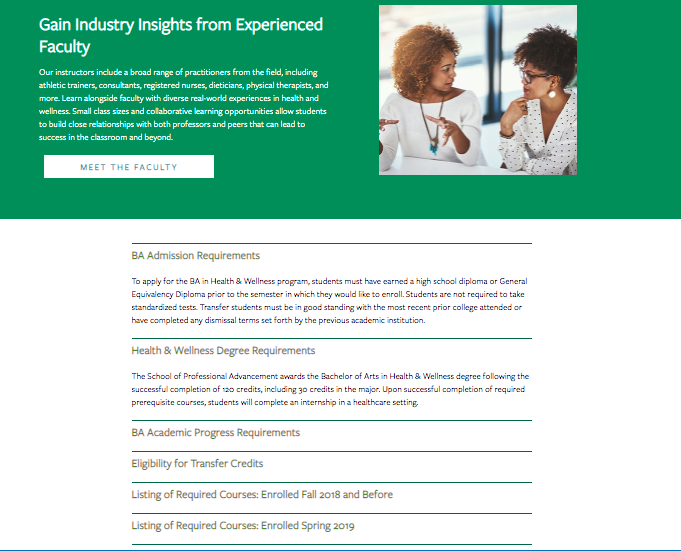
When visiting a well-built degree page, swimmers and skimmers may review general information about the degree before they’re ready to dig into logistics like admission requirements and transfer credits. Less content and less scrolling help readers stay on the page rather than bounce because they feel buried.
Site visitors further down the conversion funnel, along with first-timers who prefer maximum detail, can click each topic to get in-depth information in the drop-down. Accordion menus give readers control over how much content they consume at a time, and everyone likes to feel in charge.
Do Accordions Hurt AI Visibility?
Accordions are safe when the content inside them is present in the page’s HTML on load. They cause problems when the panel content is fetched only after a click.
Content loaded by JavaScript on user interaction may never be seen by AI crawlers, many of which do not render pages the way a browser does. Before you collapse your admission requirements behind a click, confirm that the text still appears in the rendered source.
Pro tip: Use clear, concise headers for each accordion section, and write the first sentence inside each panel as a complete answer to the header. “Admission Requirements” as a header followed by “Applicants to the [Program] need a bachelor’s degree from an accredited institution and a 2.5 minimum GPA” gives you a chunk that stands on its own.
You can also embed videos and other multimedia to enhance on-site text and give swimmers and divers other ways to explore your content. Add a text transcript or summary alongside any video, since AI systems retrieve text.
What About Acceptance Criteria and Application Deadlines Content?
Any information pertaining to an institution’s acceptance and application deadlines should be limited to pages specific to admissions and applying. This content belongs on a few key pages within your site, since application and deadline info is not evergreen (content that is timeless and remains relevant) and needs updating every few months.
When crafting evergreen content for an academic certificate or degree program page, avoid mentioning the next application date within the content itself. Pop-ups or sticky bars can communicate urgency to prospective students when deadlines approach.
AI search makes this discipline more urgent. Language models cache and reuse what they retrieve, and a stale deadline buried in an evergreen program page can surface in an AI answer months after it expired. A prospective student who gets a wrong date from a chatbot blames your institution, not the model.
Three habits reduce that risk:
- Date-stamp any page carrying time-sensitive facts with a visible “last updated” line.
- Keep dated claims in one predictable location so audits are fast.
- Write evergreen sections in terms that stay true (“applications open each spring”) rather than terms that expire.
How Should Course Requirement Pages Be Structured?
Most potential students won’t dive deeply into course requirement pages unless they’re transfer students.
Listing course names within a program on its dedicated page makes sense. Detailed descriptions of every class provide more information than potential students need at that moment. Detailed course descriptions belong in a separate on-site course catalog or on an internal site for current students.
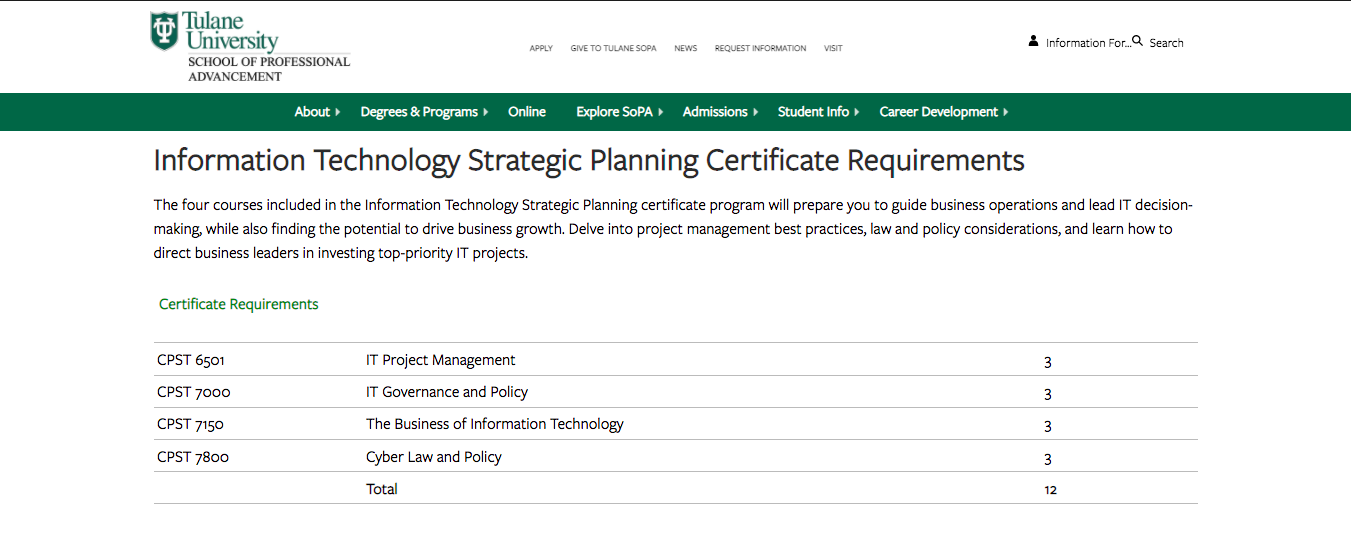
A well-structured page lists all course requirements without cluttering the table with course descriptions. The course reference number is listed, so deep divers can look up the full description in the on-site course catalog if needed.
For AI search, add structured data. Course and EducationalOccupationalProgram schema give machines an unambiguous, labeled version of what your table already shows humans: credit hours, delivery mode, prerequisites, and time to completion. Structured data will not create authority on its own, and it does reduce the chance that an AI system misreads your program.
How Do You Chunk Higher Education Blog Content?
Following a consistent blogging schedule provides useful, industry-relevant content to current and prospective students while keeping your site updated and signaling to search engines that it’s active and trustworthy.
Most of the following guidelines apply across all of your site content, blog posts included.
Break Up Content
Structure blogs with subheaders so readers know exactly what the post covers at first glance. Subheaders (H2s and H3s) visually organize your content and make it accessible and scrollable, whether readers are skimming, swimming, or diving.
Phrase subheaders as the questions prospects actually ask. Students don’t search in brand language. They ask “how long does an online MBA take” rather than “program duration overview.” A question-shaped H2 followed by a direct answer is the single highest-value chunking move available to a higher ed content team.
Other ways to break up long lists and paragraphs include:
- Bullet points
- Numbered steps
- Short tables
- Pull quotes
See what I did there?
Images and Graphics
Images are a powerful tool that can make your blog posts pop and entice visitors to read your content. They also break up text, making it skimmable for readers intimidated by a wall of copy. Use several throughout a long post rather than one at the top.
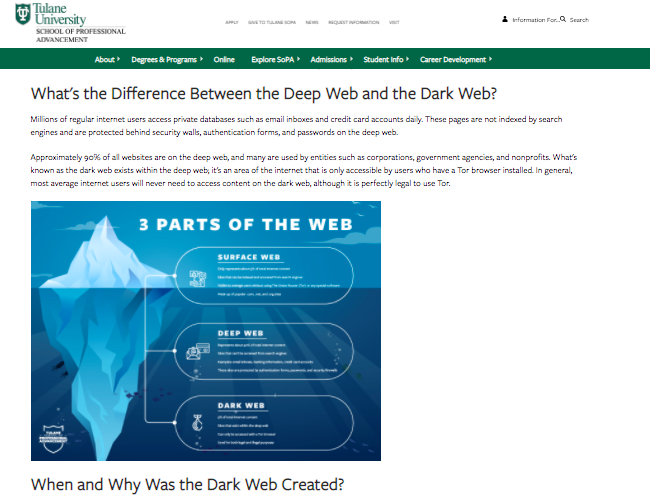
Pro tip: Use diverse photos and vector graphics reflecting different genders, races, body types, and abilities in your blog images. All prospective students should see themselves represented in your creative.
Infographics can be repurposed as mini-infographics and featured alongside related blog content to add visual appeal, break up text, and expand on information covered in the post. Mini-infographics are excellent ways to include statistics or facts in an eye-catching format.
For AI search, remember that a statistic locked inside an image is invisible to retrieval. Restate the key figure in body text or a caption so machines can read it, and write descriptive alt text.
Links and Calls-to-Action
Help your readers move along the marketing funnel with clear, specific internal links and call-to-action opportunities in all blog content. Internal links should send readers to additional, helpful pages deeper into your site. Links unrelated to the anchor text or blog content create distrust and lead visitors to bounce.
When creating an internal link, always ask how the destination page helps your reader. If you can’t come up with a straightforward answer, ditch that link.
Internal links do double duty in AI search. They map relationships between your pages, which helps AI systems understand that your institution is the authority on a topic cluster instead of a single page about it. Our post on AI SEO for higher education covers how topical clusters and citations shape what AI believes about your institution.
Every blog should end with a call-to-action, an opportunity for your reader to take the next step. Depending on where they are in the decision process, that step could be:
- Visiting a program page to learn about a degree
- Contacting an admissions counselor
- Starting an application
Blog Categories
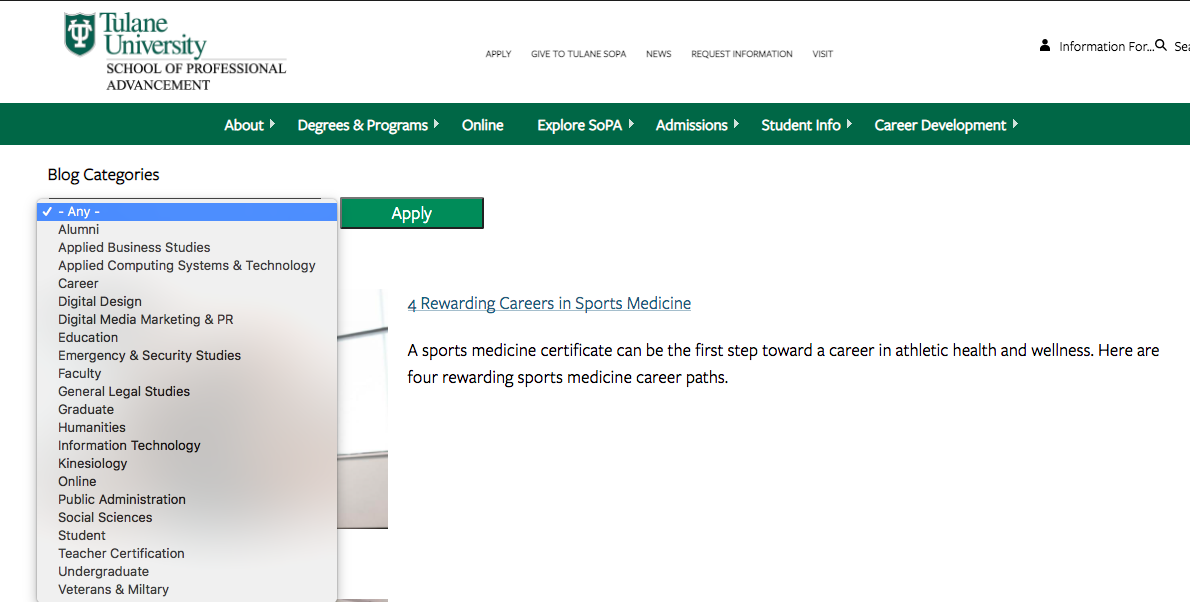
Sorting blogs by category helps users find content matched to their interests and can minimize bounce rate. Even if skimmers and swimmers never do a deep dive, they’ll see the depth of topics you cover. Clean category structure also gives crawlers and AI systems a clearer map of your topical coverage.
Should You Gate Content Downloads for Degree Programs?
Content downloads are one to two-page info sheets about a specific program or degree. They function as gated content, where the user provides basic info in exchange for access, capturing leads interested in that program.
Content downloads remain the ultimate deep dive for visitors who want maximum information, and they’re a measurable way to track site visitors who become leads. Divers and prospects further down the marketing funnel are more likely to submit an email for in-depth program information. That submitted email can trigger an email nurture campaign that guides potential students through every stage of the funnel.
Here’s the tension AI search introduces: anything behind a form is invisible to AI systems. If your best program detail lives only in a gated PDF, AI answers about your program get built from whatever ungated source exists, which is often a third-party aggregator or a competitor.
The fix is a summary layer. Publish the core facts (credit hours, cost, format, outcomes) as ungated page content, then gate the extended version with the worksheets, faculty profiles, and career data. You keep the lead capture and give AI systems something accurate to cite.
How Do You Measure Whether Your Chunking Strategy Works?
Traditional rank tracking won’t show you AI visibility. Add these checks to your reporting:
- Prompt testing. Ask ChatGPT, Perplexity, Gemini, and Google AI Overviews the questions real prospects ask about your programs, cost, and outcomes. Note whether your institution is named, ignored, or described inaccurately.
- AI referral traffic. Segment referrals from AI platforms in your analytics to see which pages earn clicks after a citation.
- Search Console query and page data. Watch for impressions on question-shaped queries that map to your new H2s.
- Citation share against competitors. Track how often peer institutions appear in the same answers you’re targeting.
Our higher education AI search strategy guide covers how to build this measurement into an existing reporting cadence.
Frequently Asked Questions
What is content chunking in SEO?
Content chunking in SEO is the practice of dividing a page into clearly labeled, self-contained sections so both readers and search systems can find and use a specific piece of information without processing the entire page.
How long should a content chunk be?
There is no universal length, because different AI systems segment content differently. Many retrieval systems work with passages in the 100 to 300-word range. Write sections that make sense on their own, and your key points survive whatever chunking method a given system applies.
Does content chunking help with AI Overviews and ChatGPT citations?
Chunking improves the odds. AI systems retrieve at the passage level, so a clearly bounded section that answers a specific question is easier to extract and cite than the same information scattered through a long block of prose. Chunking supports citation eligibility. It does not replace accuracy, expertise, or authority.
Should higher education pages be rewritten as Q&A?
No. Question-shaped H2s work well where student intent is question-led, which covers much of admissions, cost, and program content. Structured long-form pages still perform. Overusing Q&A across an entire site makes content repetitive for human readers.
Do accordions and tabs hurt AI search visibility?
Only when the hidden content loads after a user clicks. If accordion content is present in the rendered HTML, AI crawlers can read it. Test your rendered source before collapsing important program details.
How does content chunking affect page dwell time?
Chunked pages let readers find their answer faster, which can reduce time on a single page while increasing pages per session and return visits. Measure engagement across the visit rather than a single page.
Is content chunking the same as GEO or AEO?
No. Generative engine optimization and answer engine optimization are broader disciplines covering authority, entity clarity, structured data, and off-site citations. Chunking is the on-page structural layer those disciplines depend on. See our higher education marketing FAQ for how the pieces fit together.
Elevate Your Higher Ed Content Chunking Strategy With Search Influence
Work with digital marketing experts who can build a content strategy that serves skimmers, swimmers, divers, and the AI systems your prospects ask first. Contact Search Influence for lead nurturing tactics built for AI search.